

We’ve got several exciting updates coming to WooCommerce First Data to share with you, which should be available via your WooCommerce dashboard by tomorrow 🙂
Version 4.0.0 refactors large parts of the plugin to make use of some common code we have for payment gateways, improving the performance and reliability of First Data, along with the addition of a new gateway mode. This also gives First Data some useful new features, such as capturing payments from within WooCommerce, while maintaining popular features like Soft Descriptor support.
Global Gateway Improved
First, the legacy Global Gateway (formerly Linkpoint) integration has been completely overhauled. We know there aren’t too many merchants using this for payment processing, but if you need it, we’ve clarified settings and added information on where PEM files should be stored on your site.
As part of this, we also have more details coming to our documentation this week on how to get set up with the legacy Global Gateway. Note this gateway is still deprecated and we won’t be adding features to this, but if you’re stuck using this method, hopefully it’s now less painful to set up 😉
Payeezy Gateway Rewritten
The core Payeezy method (now titled “Payeezy Gateway”, previously “GGe4”) has been improved as well. We’ll tell you about some specific features in a bit, but this also leverages some of our common gateway code for better performance.
Improved payment forms, account management, charge captures, and detailed decline messages are just some of the improvements we’ve made.
Payeezy Added
We’ve also added a new gateway method from First Data: Payeezy API (titled “Payeezy” in the plugin). Merchants currently using Payeezy Gateway can ask First Data to have their merchant accounts upgraded, and once this is done, can switch to using this gateway mode instead:

One of the main benefits of the new Payeezy is basic PCI compliance. When we’d written about WooCommerce PCI compliance, we talked about “Client-side direct” gateways that tokenize / encrypt payment data before sending it through your servers so that you meet the most basic PCI requirements automatically.
Payeezy affords merchants the ability to use a tokenization SDK like this, providing a security improvement over Payeezy Gateway.
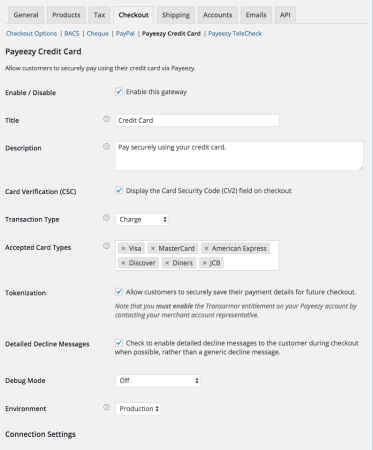
Payeezy also includes the same great features that Payeezy Gateway has already had, such as refund and void support from directly within the WooCommerce admin. It also fully supports WooCommerce Subscriptions and Pre-Orders so long as tokenization is enabled in the plugin and within your First Data account.
Capture Charges from WooCommerce
Both Payeezy and Payeezy Gateway now support capturing charges from directly within the WooCommerce admin. If you authorize transactions without capturing them, you can now capture the charge from within WooCommerce:
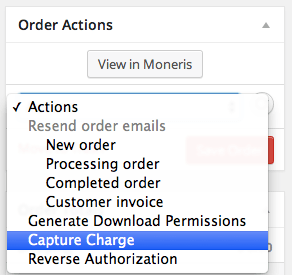
This will automatically update the order status from on hold to processing, and captures the charge within First Data so you don’t have to log into your merchant account.
Charges can be captured for several orders at once via bulk action as well.
Improved Checkout and TeleCheck Support
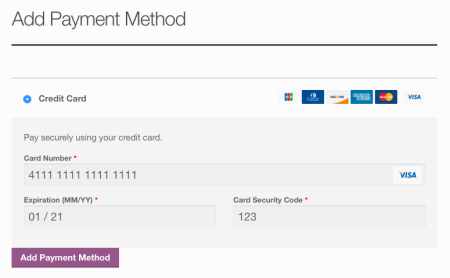
All gateway modes will now benefit from an improved payment form at checkout that recognizes and auto-formats card types, along with expiration dates.
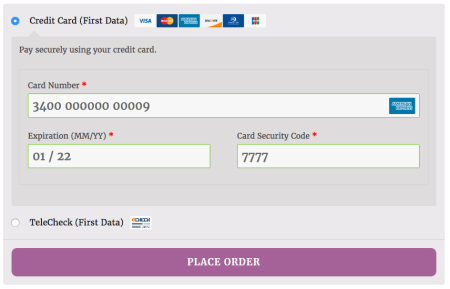
In addition, TeleCheck support has been added to Payeezy and Payeezy Gateway to let you accept eCheck payments for one-off purchases.
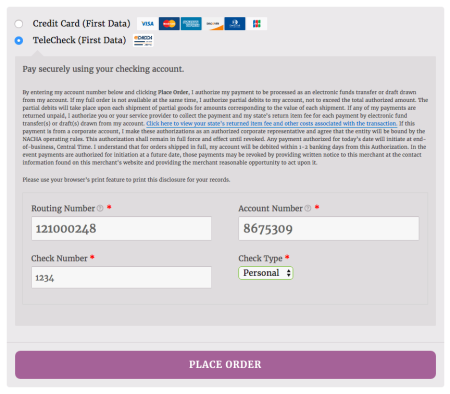
TeleCheck does not support tokenization / Subscriptions, but can be used for any single order.
Detailed Decline Message Support
Payeezy and Payeezy Gateway support detailed decline messages at checkout. Any time a transaction is declined by First Data and a useful / specific error is returned, a detailed message is displayed rather than the generic, “please try another payment method” notice.
Account Management Improvements
There are a couple new account management improvements supported by Payeezy Gateway and Payeezy. First, customers can add new saved cards from directly with the “My account” area without the need to go through checkout to add new payment methods.
When Subscriptions is active, the saved payment method table will also now show more detail, such as any linked subscriptions the card is used for (thanks to some great work by Chase in our plugin framework). If one subscription is linked, a “View Subscription” button will be included. If multiple subscriptions use the same saved method, a comma-separated list of subscription IDs (with links) will be shown and this button is hidden.
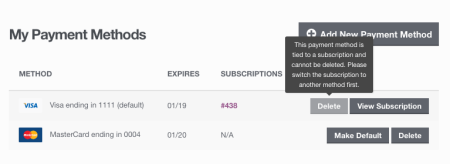
This also changes how card deletions are handled. If a card is currently linked to a subscription, it can no longer be deleted to avoid failed renewal payments that require a manual card token update. The subscription must be switched away from this card to remove it.
Ready to give it a go? You can download the update from WooCommerce once it’s deployed, and we’ll update our documentation then as well. As always, if you run into any hiccups with upgrades or new features, we’re happy to help via the help desk.