

New extension alert!
We know that many of you have been waiting for this one, so we’re really pumped to release WooCommerce Social Login out into the wild 🙂 . Want to pick it up by 11am EST on August 13? Use the coupon code woocommerce-social-login for 25% off!
Sounds Cool. What does this do?
eCommerce has been growing rapidly and will continue to do so. As more users purchase from online stores, they’ve discovered something about their shopping habits. For every store they visit, they’ll either have to check out as a guest (which requires them to constantly enter personal information) or they have to remember about a zillion username and password combos. Even worse, some customers use the same credentials for every site so they can remember them.
When customers use the same username and password combo, they’re participating in a habit that is incredibly lacking in security and only requires one site breach to expose their personal data across many sites. For example, if I did this and my Amazon.com credentials were breached, this information could be used at tons of sites, from PapaJohns.com to Nordstrom.com.
To combat this, many stores now offer social sign-in. Customers can link social accounts, such as Facebook or Twitter, to login information so that they can securely log into their favorite eCommerce stores without (a) risking security by using the same credentials and (b) remembering tons of login combinations.
Social Login is a win-win for customers and shop owners, as security is increased by using a secure social sign-in method, and customers can easily float from site to site without using several sets of login credentials. Want some research on how popular and useful social login is? We have lots of it on the WooCommerce Social Login product page.
Got it. Any other benefits?
Yes! Almost every customer has come across social sign-in, and they’re far more likely to create an account with social login than check out as a guest. That means you’ve just made a repeat visit to your site far easier for this customer, as they’ll be able to save personal details to their new account.
Customers tend to stay signed into social accounts, which means they’ll always be signed in when they visit your store. This reduces friction when purchasing, as customer’s will be logged into your store, and personal details (like shipping information) are ready to go. Ordering from your store becomes as seamless as possible.
WooCommerce Social Login lets customers link Facebook, Twitter, Google, and/or Amazon to your WooCommerce store to benefit from secure and easy sign-in. With these four networks, we’ve covered over 87% of social sign ins.
Awesome! What else does WooCommerce Social Login do?
Once you’ve created apps for your store with each social network (don’t worry, we have detailed instructions on this!), you can enable social login with each of these networks. You can also vote for the next networks to be added in the plugin documentation.
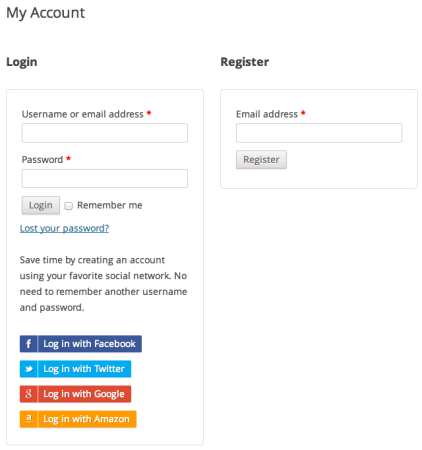
Customers will see this option at checkout:

They’ll also be able to link social accounts when logging in:
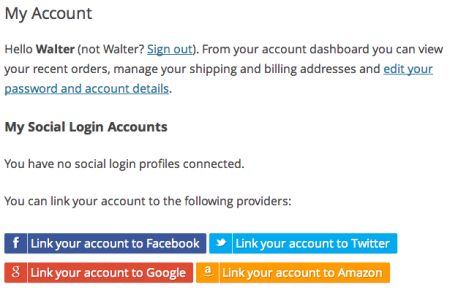
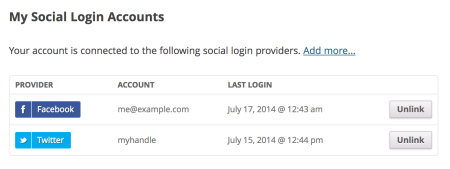
For existing customers, they can link new social accounts to your store, or unlink them as desired:
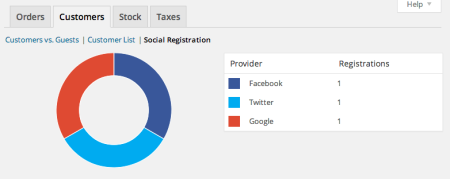
As a shop manager, you can also check out how many users have registered with social accounts by viewing the admin reports for “Social Registration” with the customer reports.
Even if customers unlink all social accounts or you stop using the plugin, they’ll still have accounts available for your store! WordPress user accounts are created with the email that’s tied to their social account (the exception to this is Twitter, who doesn’t return an email – a username is added and set to the Twitter handle). This makes it possible to reset the password and use accounts normally if customers unlink accounts or the extension is deactivated.
Ready for purchasing or more details? Check out the plugin page at WooCommerce or view the full documentation.