

Here’s a quick question we’d gotten in a support thread: How can I add a link to “Cancel” a membership with it’s subscription to the “My Memberships” table?
Unfortunately, adding a link to cancel both a membership + it’s associated subscription isn’t really straight-forward — this is why the “cancel” action is removed in the first place when a memberships is tied to a subscription. This way, cancelling the billing record is the only way to cancel the membership (as cancelling a membership without stopping billing could cause headaches).
However, we can do something to work around this a bit: link to view the subscription associated with the user’s membership (if available) in the “My Memberships” table. The member area table actions are filterable, so you can remove or add your own actions pretty easily.
I’ve put together a simple snippet to do just that, and you can view the full snippet here.
We need it to do a few things:
- Get the subscriptions handler so we can check if the membership is tied to a subscription
- If tied to a subscription, add a new action to view the subscription in the account
- (Optional) rename the “View” action to “View Perks” or something similar, as we’ll now have 2 actions: “View Perks” (just “View” by default) and “View Billing”
function sv_wc_memberships_add_view_subscription_action( $actions, $user_membership ) {

    $integration = wc_memberships()->get_integrations_instance()->get_subscriptions_instance();

    if ( $integration->is_membership_linked_to_subscription( $user_membership ) ) {

        $subscription = $integration->get_subscription_from_membership( $user_membership->get_id() );

        $actions['view-subscription'] = array(
            'url'  => $subscription->get_view_order_url(),
            'name' => __( 'View Billing', 'my-textdomain' ),
        );

        $actions['view']['name'] = __( 'View Perks', 'my-textdomain' );
    }

    return $actions;
}
add_filter( 'wc_memberships_members_area_my-memberships_actions', 'sv_wc_memberships_add_view_subscription_action', 10, 2 );
You can adjust the text in this snippet for your action buttons as desired, but once this is implemented, the “My Memberships” table will now have a link to view the subscription / billing record, making it easy for the member to cancel the billing:
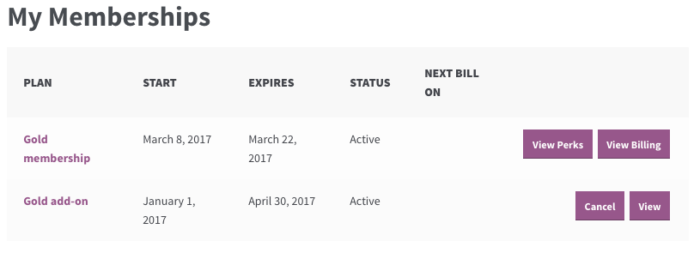
When this is clicked, it will immediately take the customer to the “View Subscription” page within the account:
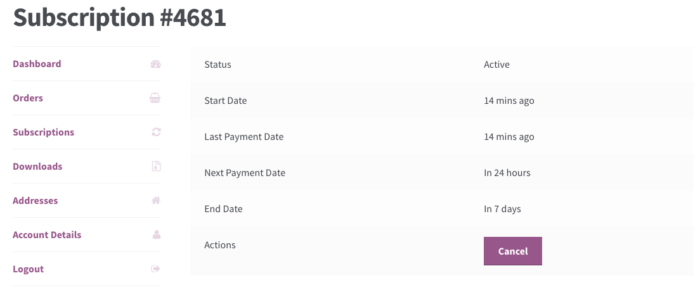
This lets them update or cancel the billing record associated with the membership easily.